One place to capture, organise and act, with publishing connected to the thinking behind it.
Where it standsPrivate, in use
Year2026
What we builtPrivate command centre, social studio and outreach workspace
Rijn Admin is the private command centre behind the work: projects, tasks, ideas, social publishing and go-to-market thinking in one system. It is built to capture context quickly, turn it into action and keep good work from disappearing between disconnected tools.
The task sits in one app, the context in a chat, the content idea in a note and the follow-up in memory.
01
Its own mess
Running several products, client projects and experiments at once creates its own mess. Every tool can work and the day still feels scattered.
02
One place to act
Rijn Admin is the private system we built for Rijn's own work, starting in April 2026: one place to capture, organise and act.
How it ranBefore
An appThe task.
A chatThe context.
A noteThe content idea.
MemoryThe follow-up.
What was breaking
01
Ideas lost their context before they became work.
02
Projects and daily priorities lived in different places.
03
Posts were written, scheduled and measured in separate tools.
[02] What we changed
Capture it once, act on it in one place.
Shorten the distance between noticing something and acting on it.
01
Capture fast
Capture fast, and organise once there is enough context.
02
Publishing stays connected
Keep publishing connected to the thinking behind it.
An appThe task.
A chatThe context.
A noteThe content idea.
MemoryThe follow-up.
Before
Now
Before: An app, A chat, A note, Memory. Now: Private, in use.Drag, or use the arrow keys
01
Before: A thought jotted wherever was closest.
Now: Quick capture turns it into a task, project, note or idea.
02
Before: Priorities spread across apps and calendars.
Now: The day's projects, priorities and calendar on one dashboard.
03
Before: Project notes kept apart from the next action.
Now: Each project holds its context and its next actions.
04
Before: Write the post again for each network.
Now: Compose once, preview each network, then publish or schedule.
01 / Real screenQuick capture
[03] How it works
From a passing thought to a published post.
Anything important enters through one capture point, and the dashboard then surfaces what matters now.
01
Organised when ready
Anything important is organised when there is enough context to get it right.
02
Checked per network
For social work, one composition is checked against each network it will appear on, and media is prepared for the destination. Scheduled or published work stays connected to the original idea.
Rijn
A thought goes in through one fast capture point.
Rijn
It becomes a task, project or idea once there is enough context.
The systemTakes over here
The dashboard shows what matters today, without flattening every project into the same urgency.
Rijn
Write a post once and preview it for each network.
Rijn
Publish now, or schedule it.
The system
Post metrics feed the next decision.
Real screenQuick capture
[04] What we built
One system, three workspaces.
A private command centre for projects and tasks, a social studio for publishing and a go-to-market workspace for outreach.
01
Three private workspaces
A private command centre for projects and tasks, a social studio for publishing and a go-to-market workspace for outreach.
01 / 03
Command centre
For rijn's daily workWeb, private
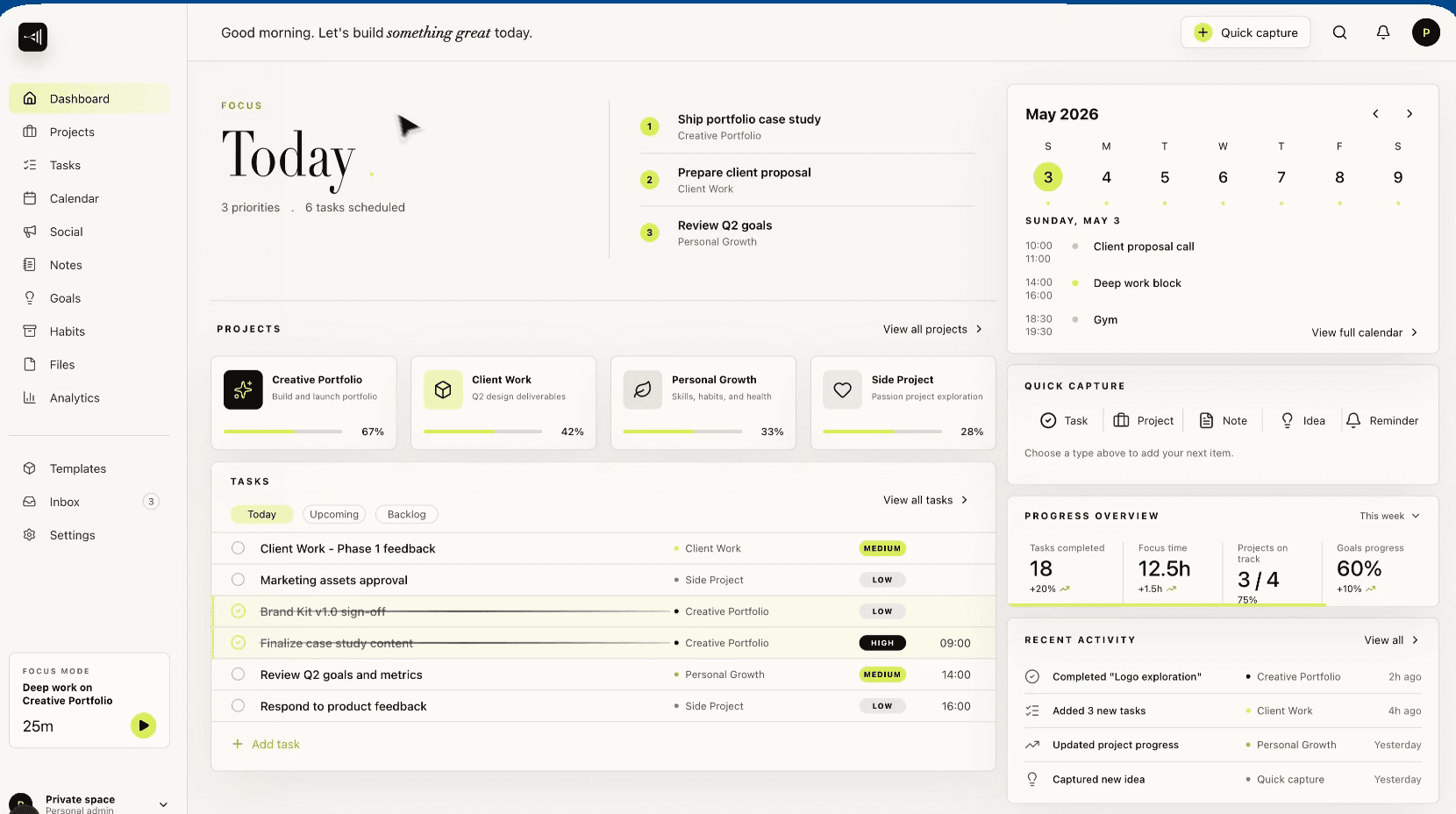
The dashboard shows projects, priorities, recent activity and the calendar, with quick capture one shortcut away.
Daily dashboard with calendar context
Projects and tasks, connected
Quick capture from anywhere
Real screenQuick capture
4 real screens · tap to enlarge · select to enlarge
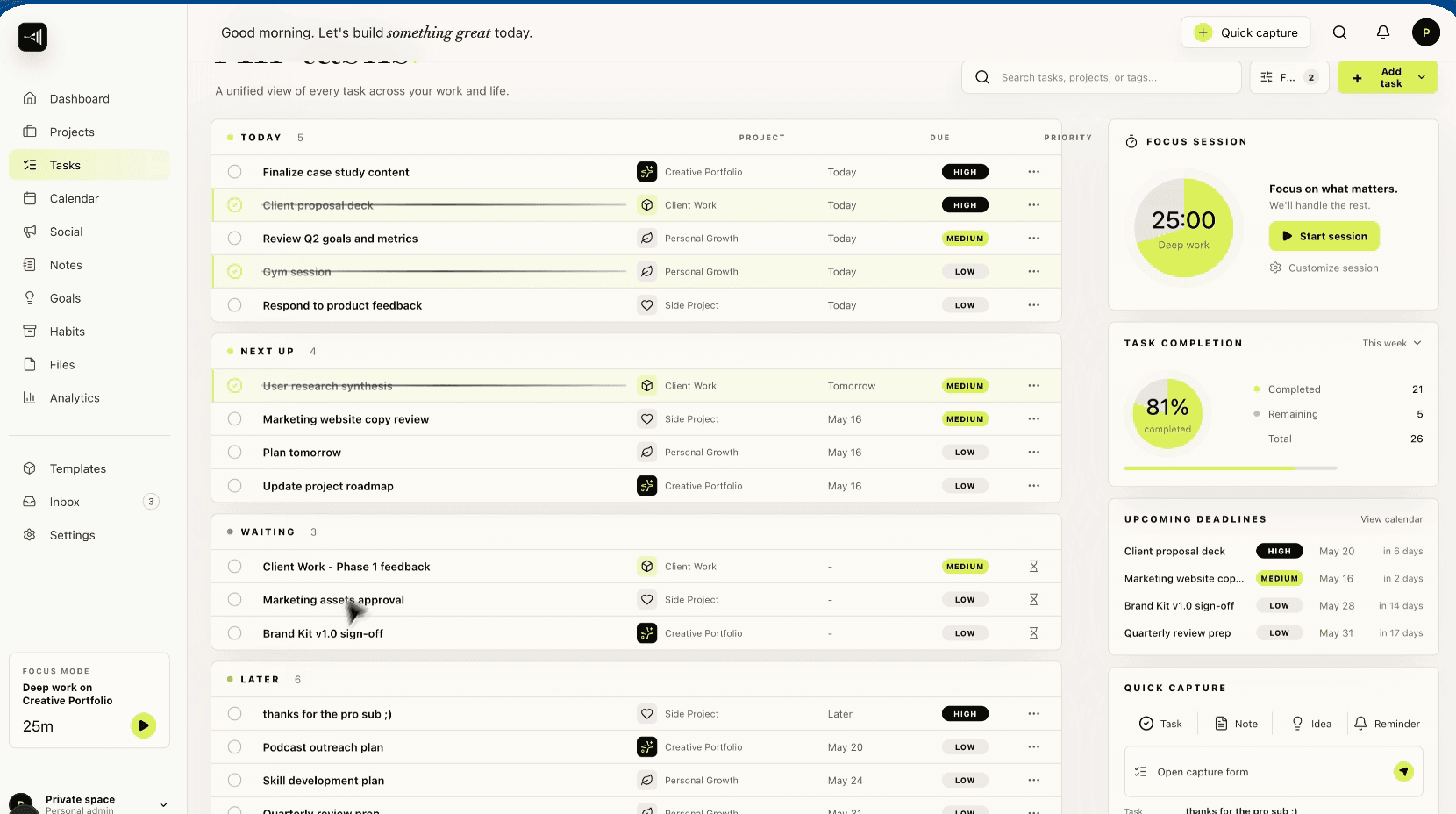
Daily command centre
The projects, priorities, activity and calendar context that shape the day.
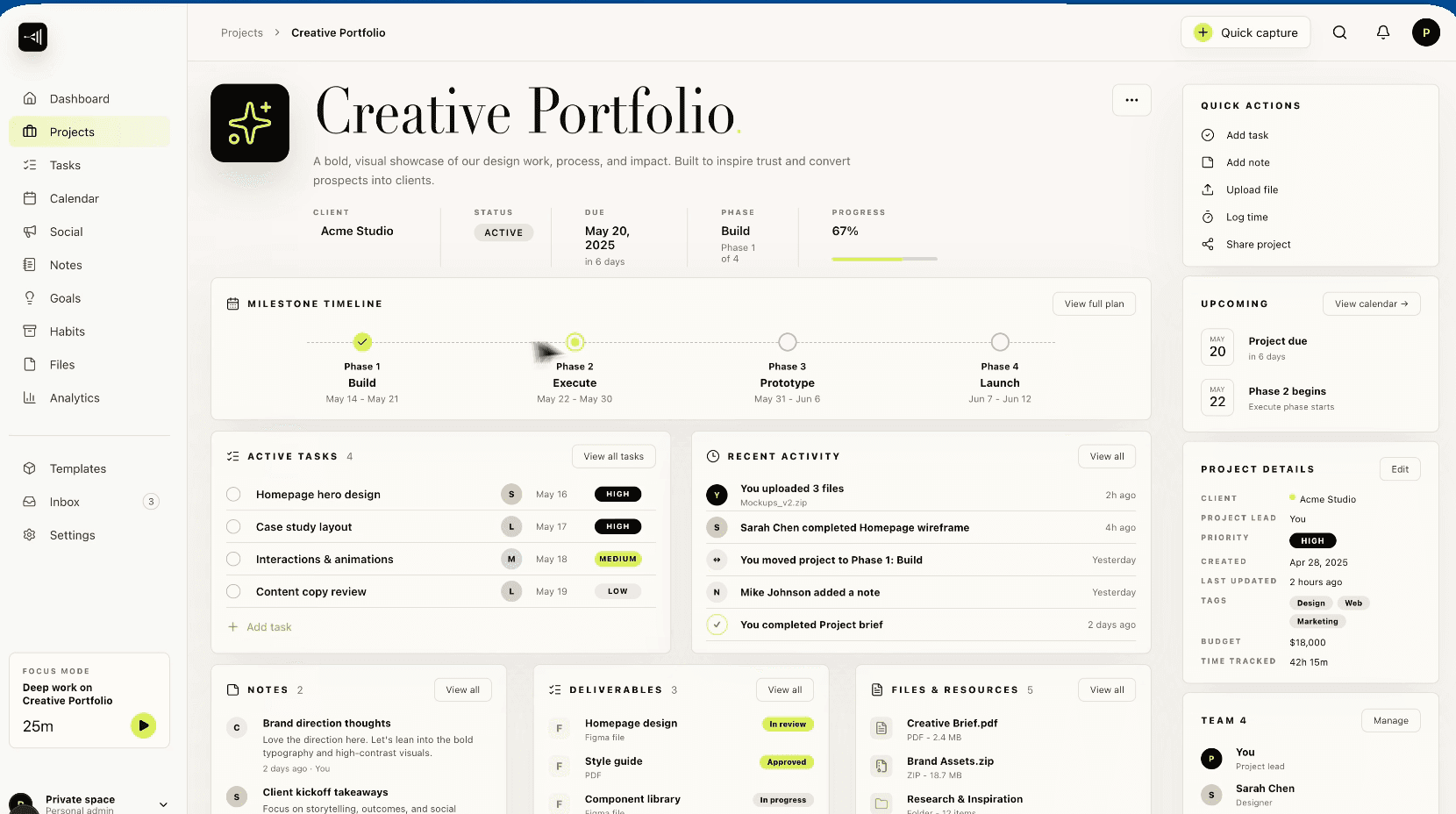
Project workspace
The working detail behind an idea, its next actions and everything already learned.
Task system
Priorities, ownership and next actions stay connected to the projects they move forward.
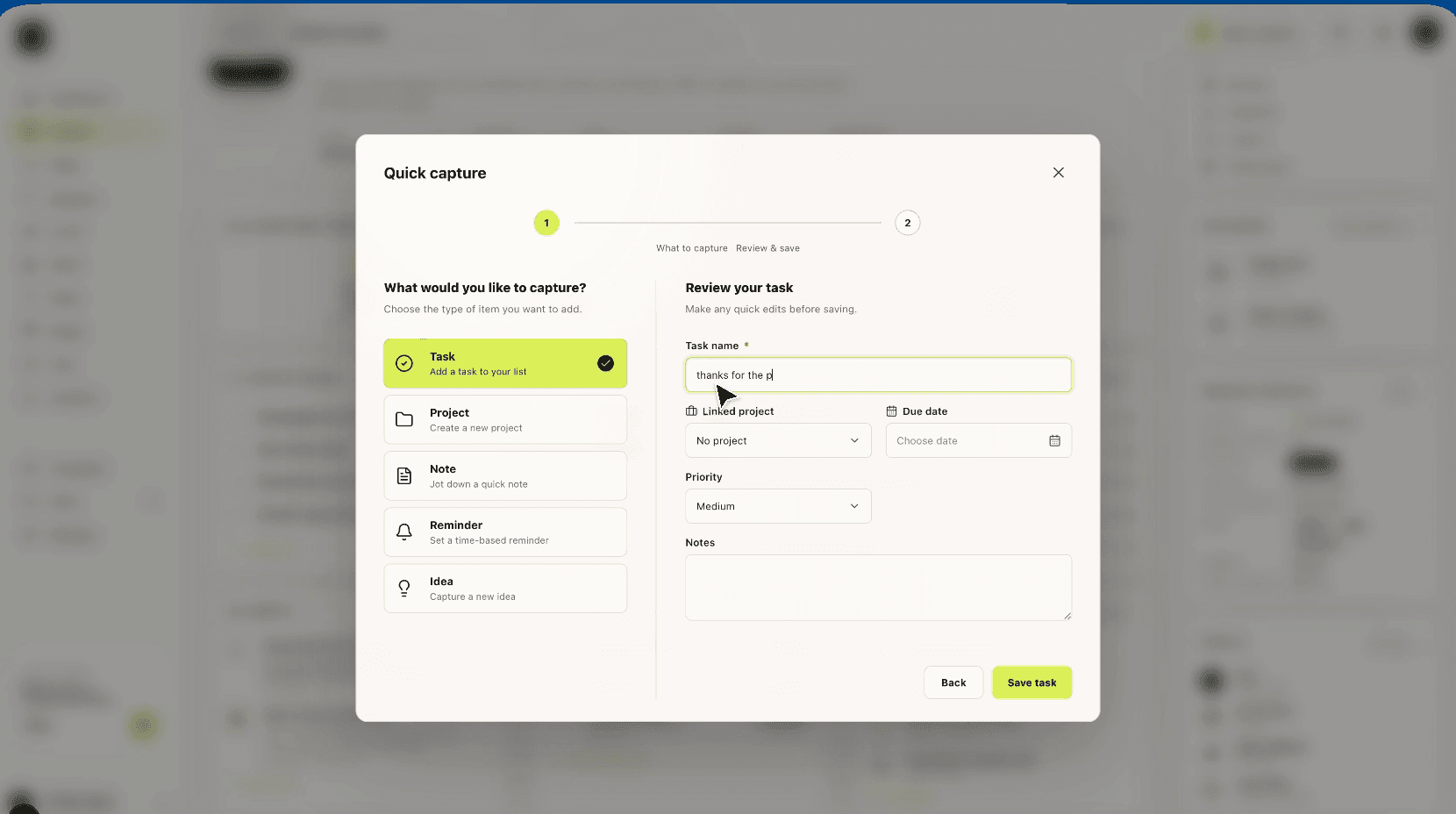
Quick capture
A passing thought can become structured work without breaking the current flow.
Screen 01 / 04
02 / 03
Social studio
For publishingX and other networks
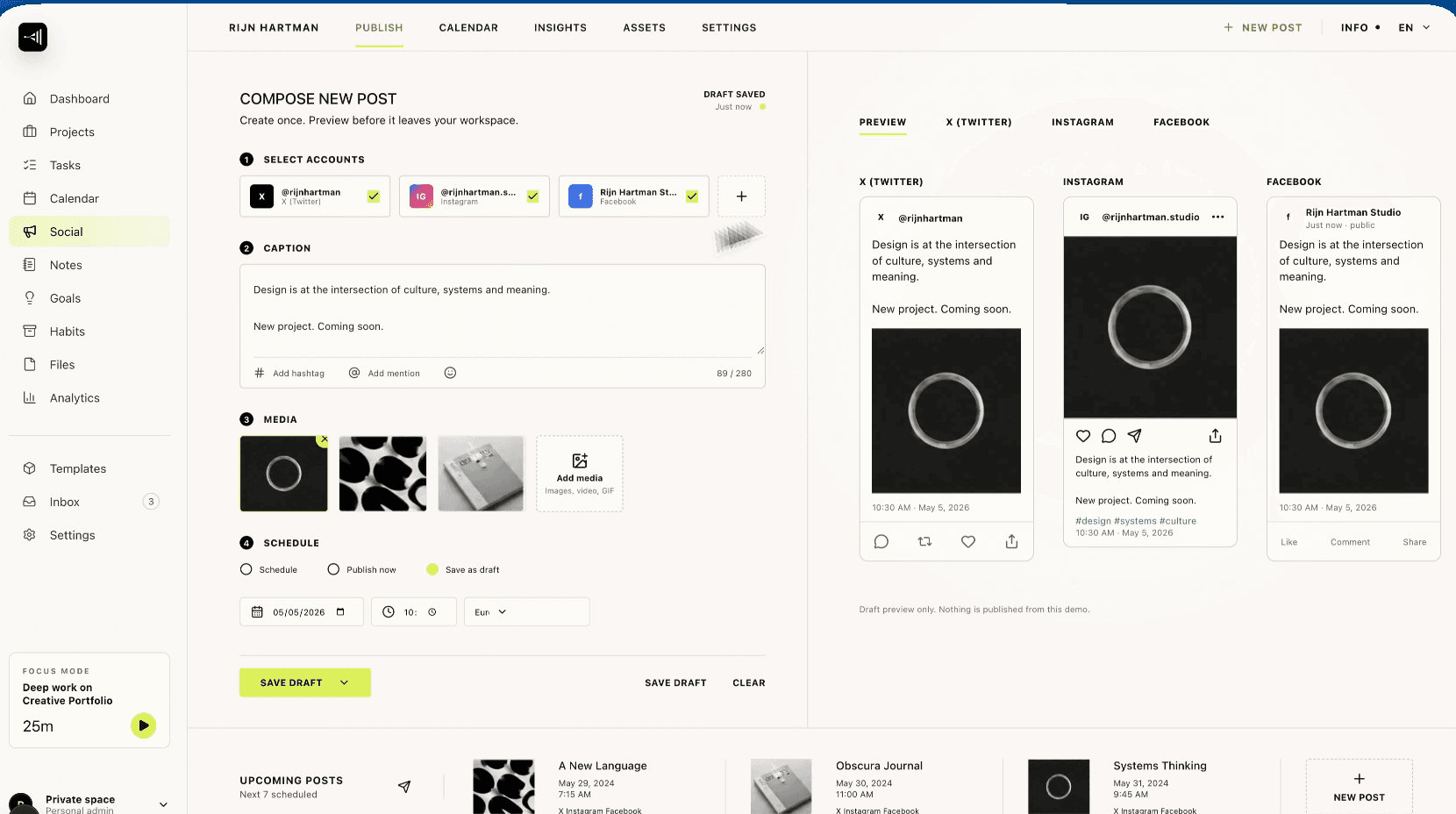
One composition, checked against each network it will appear on, then published now or scheduled. What happens after feeds the next post.
Previews per network
Media prepared for each destination
Scheduling and publishing
Post metrics and daily social intelligence
1 real screen · tap to enlarge · select to enlarge
Social publishing studio
Compose once, preview each network and publish now, schedule or save the draft.
03 / 03
Go-to-market workspace
For outreachWeb, private
Leads, campaigns and outreach previews, kept next to the projects they belong to.
Leads and campaigns
Outreach previews
Where a thought can go
Quick capture turns a passing thought into structured work without breaking the current flow.
01
Task
02
Project
03
Note
04
Idea
Quick capture. A passing thought can become structured work without breaking the current flow.
What it handles
Daily command-centre dashboard
Projects, tasks and quick capture
Calendar and priority context
Multi-network social composer
Media library and video preparation
Scheduling and publishing workflow
Go-to-market working space
X post intelligence and learning loop
[05] What changed
Less distance between noticing and doing.
The system works less like a filing cabinet and more like part of the working day.
Daily command centre. The projects, priorities, activity and calendar context that shape the day.
01
Where a thought can go
4
02
From a passing thought to a published post.
6steps
Where it stands
Private, in use
Apr 2026→Aug 2026
Dates from our project records and release history.
Release
First version of the dashboard.
then, +1 month
Update
Google sign-in, publishing and scheduling on X, then post intelligence.
then, +1 month
Preview
Go-to-market previews and outreach.
then, +2 months
Update
Content control room and daily social intelligence.
Dates from our project records and release history.
Ideas become organised work before their context disappears.
Projects and daily priorities sit in the same picture.
Posts go from draft to network preview to schedule in one place.
Automated evening checks on our posts on X run from it.
01
Part of the day
The system works less like a filing cabinet and more like part of the working day.
02
Evening checks on X
It also runs the automated evening checks on our posts on X, so the next post starts from what the last one did.