A till that keeps selling when the Wi-Fi drops, a cash-up that checks money and stock separately, and owner reports by email.
Where it standsIn daily use
Year2026
What we builtOffline till, guided cash-up, owner admin and report emails
A biltong shop that sells by weight ran its stock on paper and in Excel, and its cash-up by hand. We built a till that keeps selling when the Wi-Fi drops, a cash-up that checks money and stock separately, and owner reports by email. It is in daily use.
A biltong shop that sells by weight ran its stock on paper and in Excel, and its cash-up by hand.
01
Sold by weight
This shop sells biltong, dry wors and chilli bites by weight, plus drinks and snacks, seven days a week. Two staff work the counter, one at a time, on Android tablets, and the Wi-Fi drops now and then.
02
Paper, Excel, two machines
Before the till, stock lived on paper and in Excel, and cash-up meant counting the money and weighing what was left by hand. The two card machines were not linked to anything.
03
Hard for new staff
The owner's biggest frustration was how hard that process was for new staff to get right.
How it ranBefore
PaperStock counts written down, with what was left weighed by hand.
ExcelStock tracked in a spreadsheet, apart from the sales.
Card machinesTwo of them, linked to nothing else.
Cash-up by handCount the cash, weigh what is left, compare the two.
What was breaking
01
Most sales are by weight, so one slip at the counter skews the stock.
02
Sales, stock and card payments never sat in one record.
03
The process was hard to get right for every new staff member.
04
The Wi-Fi drops, so a till that needs the internet would stop selling.
[02] What we changed
One record, from the counter to the owner.
Put the counter, the stock and the owner's numbers in one record, and make the staff's part short and forgiving.
01
One record
Put the counter, the stock and the owner's numbers in one record, and make the staff's part short and forgiving.
02
Owner controls, out of reach
Owner-only controls stay where staff cannot reach them by accident.
PaperStock counts written down, with what was left weighed by hand.
ExcelStock tracked in a spreadsheet, apart from the sales.
Card machinesTwo of them, linked to nothing else.
Cash-up by handCount the cash, weigh what is left, compare the two.
Before
Now
Before: Paper, Excel, Card machines, Cash-up by hand. Now: In daily use.Drag, or use the arrow keys
01
Before: Weigh it, work out the price, write it down.
Now: Type the weight on a large number pad; the till prices it.
02
Before: A till and card machines that never agree.
Now: Cash, card or other, confirmed on every sale.
03
Before: Stock in a spreadsheet, updated later.
Now: Every sale moves the stock, and low stock is flagged.
04
Before: Count the cash and hope it balances.
Now: A guided cash-up checks money and stock separately.
05
Before: Totals added up at month end.
Now: Monthly reports on revenue, payment mix and products.
01 / Real screenQuantity interaction
[03] How it works
One shop day, open to close.
The till keeps its data on the tablet and syncs in the background, so a dropped connection never stops a sale.
01
Selling without Wi-Fi
The till keeps its data on the tablet and syncs in the background, so a dropped connection never stops a sale.
02
Corrections leave a trail
A correction to stock is an owner action with a reason and an audit trail, so the day's story is never silently rewritten.
Staff
A personal PIN, then the morning stock count before the first sale.
Staff
By weight or by unit, with the payment method confirmed. Selling past the stock needs a logged override.
The systemTakes over here
Each sale updates the shared record and moves the stock, even while the Wi-Fi is down.
Staff
If the customer wants one, a WhatsApp receipt.
Staff
Count the money and weigh the stock, then recount or send it for review.
Owner
The dashboard, the stock audit and a report email after closing.
Real screenStock control
[04] What we built
Fast for staff. Complete for the owner.
A till that keeps selling offline, a guided cash-up and an owner admin with report emails.
01
Till, cash-up and admin
A till that keeps selling offline, a guided cash-up and an owner admin with report emails.
01 / 03
Staff till
For staff at the counterAndroid tablet, works offline
Staff sign in with a PIN, count the stock in the morning and sell by weight or by unit, with the payment method confirmed on every sale.
PIN sign-in and a morning stock count
Weight and unit sales with discounts
Keeps selling offline, syncs when the Wi-Fi is back
WhatsApp receipts
Real screenQuantity interaction
3 real screens · tap to enlarge · select to enlarge
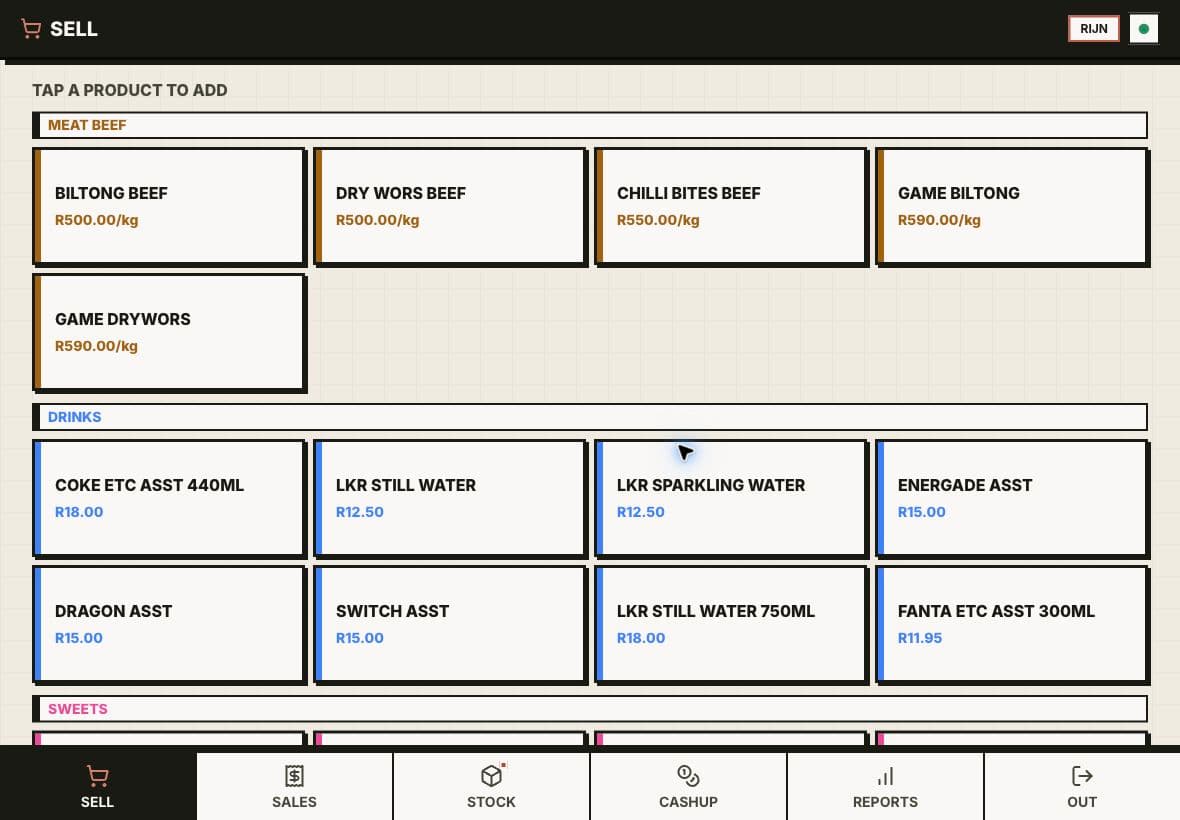
The selling screen
The counter view keeps weighted and unit products visible, fast and easy to reach.
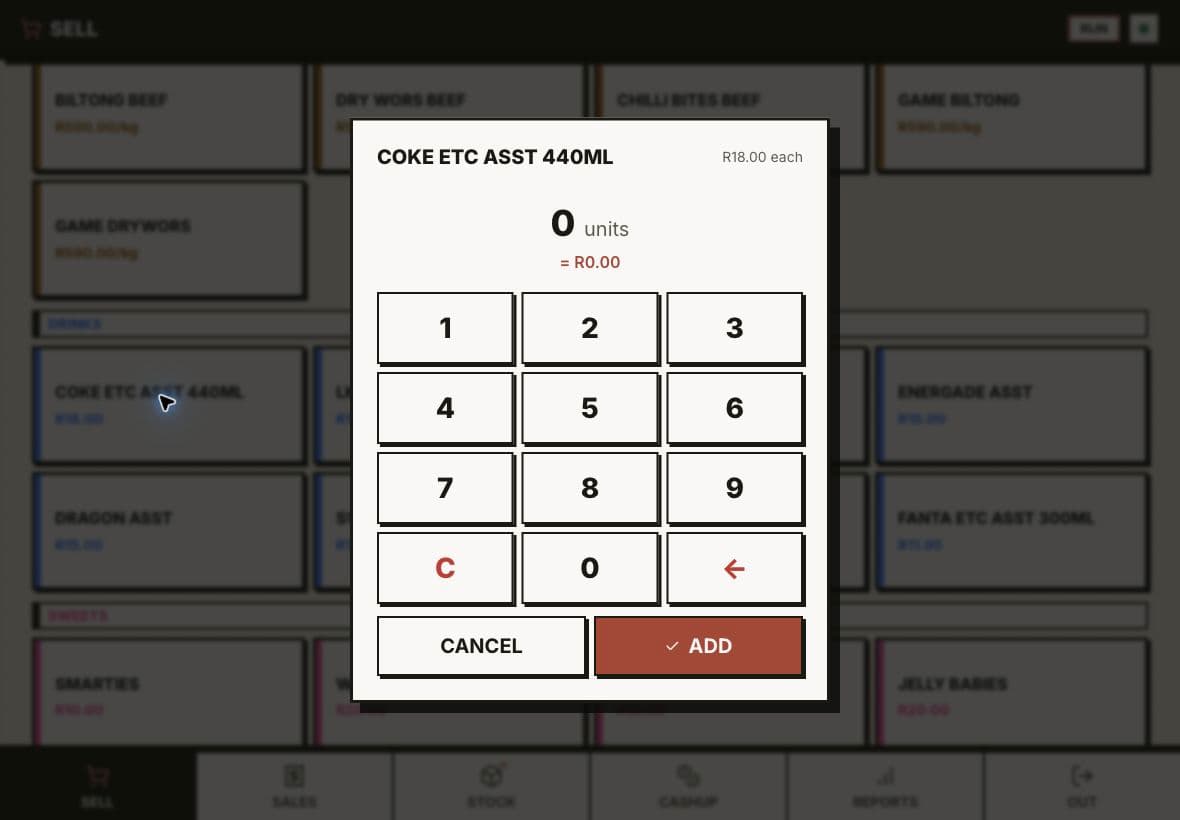
Quantity interaction
A large, focused number pad makes quick counter input obvious without cluttering the main screen.
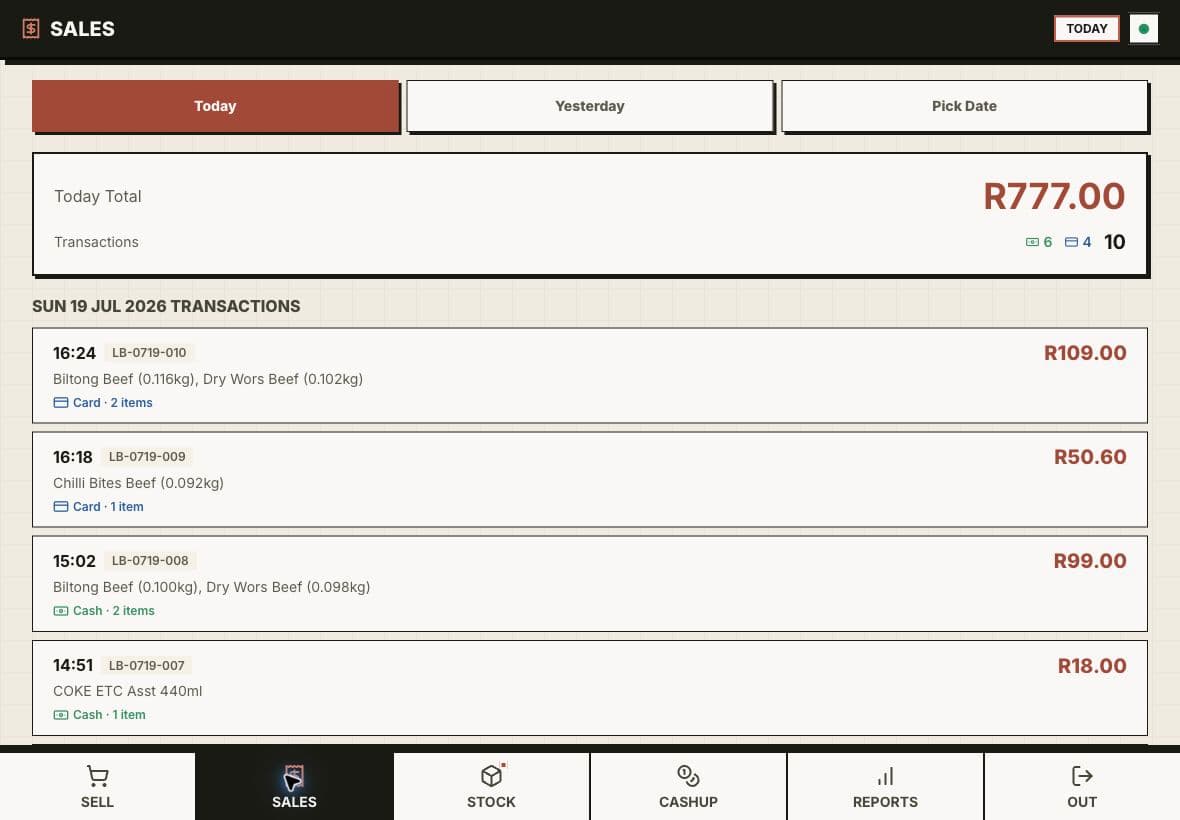
The sales ledger
Every transaction keeps its time, basket, payment method and total in one readable record.
Screen 01 / 03
02 / 03
Cash-up
For staff and the ownerThe same tablet
At the end of a shift, staff count the money and weigh the stock. The till compares both with what it expected and shows any difference, money and stock apart.
Money and stock checked separately
Recount, or send for the owner's review
Result shared with the owner on WhatsApp
Every past run kept with its difference
2 real screens · tap to enlarge · select to enlarge
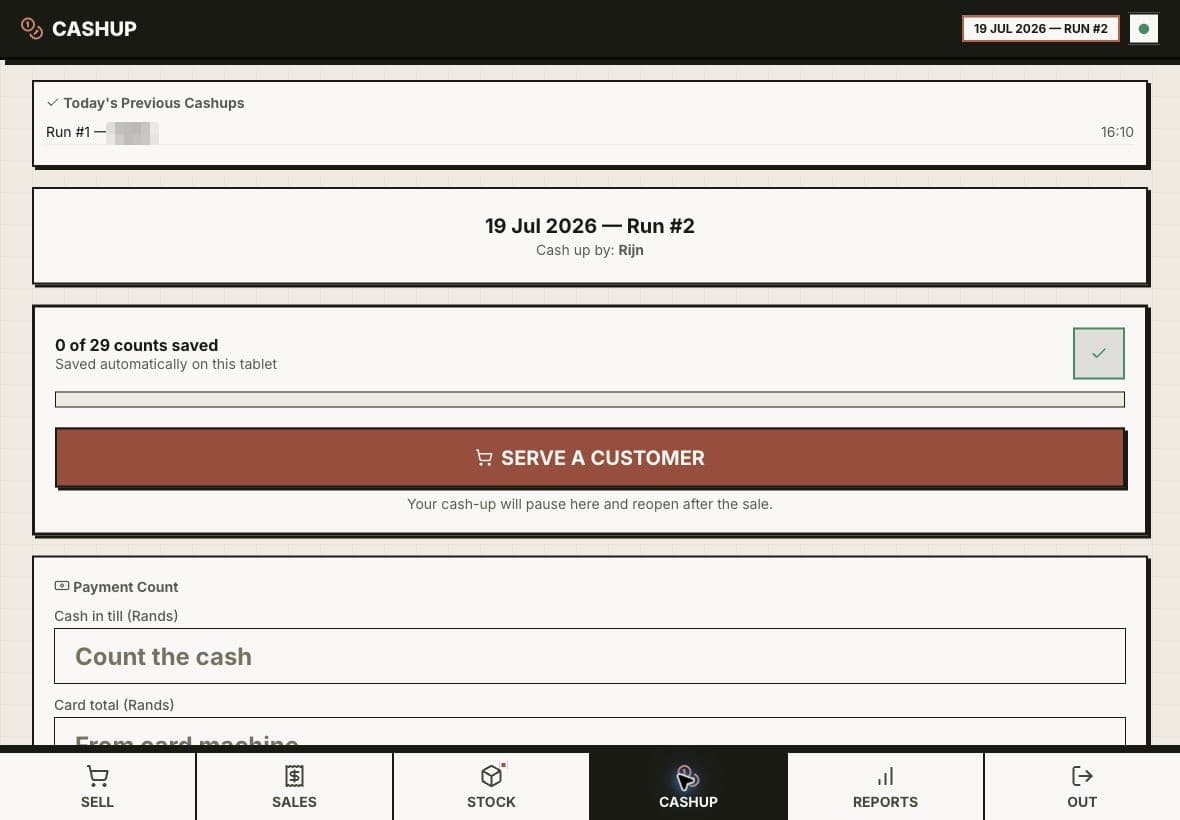
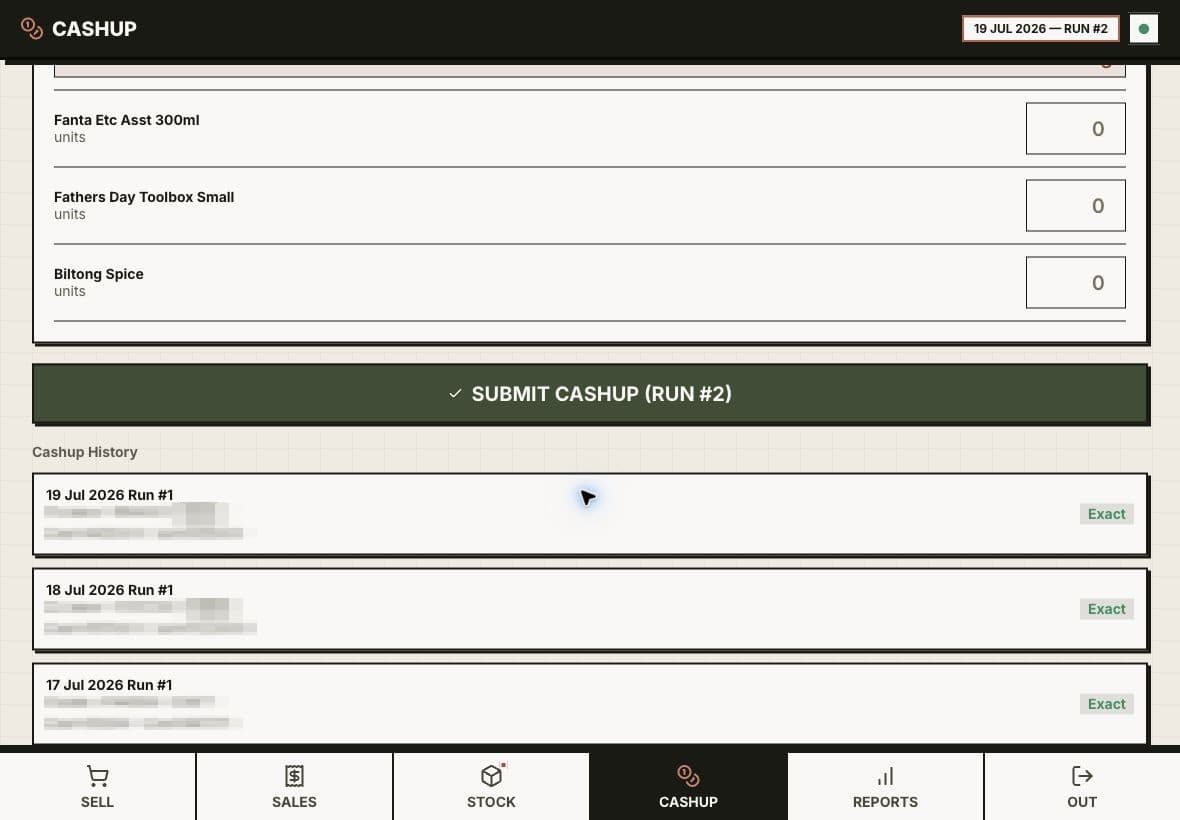
Cash-up workflow
Staff can count money and stock in one guided run without losing the customer-facing flow.
Cash-up history
Past runs, variances and the person responsible stay visible instead of being overwritten.
Screen 01 / 02
03 / 03
Owner admin and reports
For the ownerWeb and email
The owner sees sales, payment mix, profit, low stock and staff activity, and corrects stock only with a reason that stays on record. Reports arrive by email after closing.
Products, categories and staff
Stock audit with reasons
Daily, weekly and monthly report emails
Sales by hour and weekday
Real screenMonthly reporting
2 real screens · tap to enlarge · select to enlarge
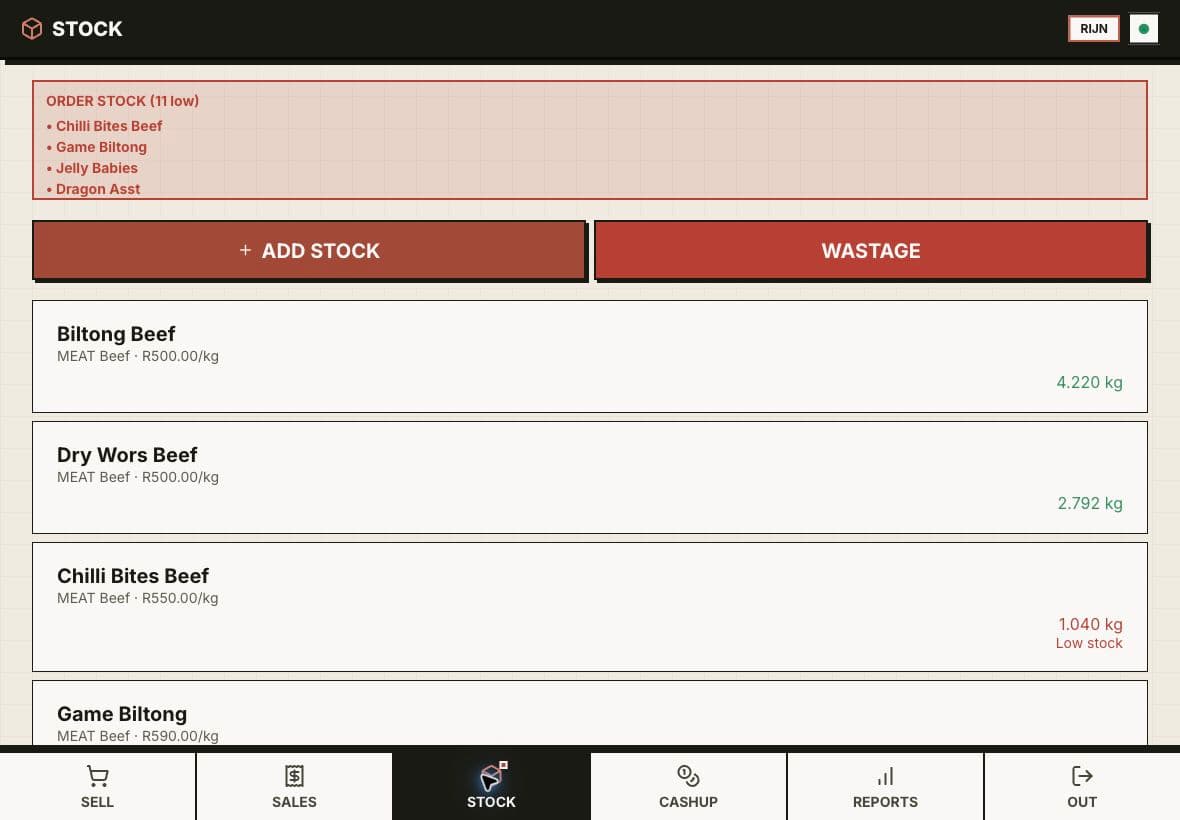
Stock control
Live quantities and low-stock warnings connect the shelf directly to the till.
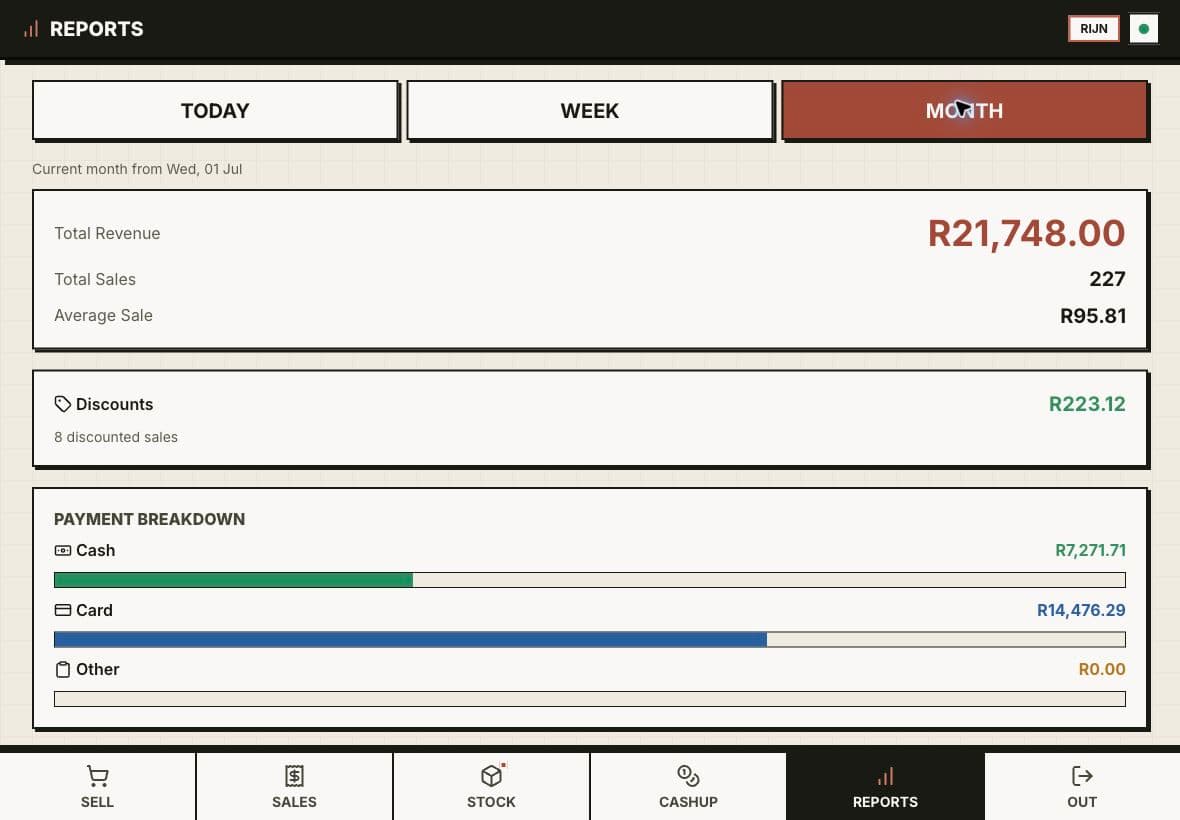
Monthly reporting
Revenue, payment mix and product performance give the owner a clear view of the business.
Screen 01 / 02
What the counter sells
Most sales are by weight, plus drinks and snacks, seven days a week.
01
Biltong
By weight
02
Dry wors
By weight
03
Chilli bites
By weight
04
Drinks and snacks
The selling screen. The counter view keeps weighted and unit products visible, fast and easy to reach.
What the system handles
Owner-only controls stay where staff cannot reach them by accident.
Offline-first staff till with PIN sign-in
Weight and unit sales with discounts
Morning stock count and live stock
WhatsApp receipts
Cash-up that checks money and stock
Owner admin with a stock audit
Daily, weekly and monthly report emails
[05] What changed
In use, every trading day.
The till is in daily use, and stock moves with every sale instead of being updated later in Excel.
Cash-up history. Past runs, variances and the person responsible stay visible instead of being overwritten.
01
What the counter sells
4
02
One shop day, open to close.
6steps
Where it stands
In daily use
Feb 2026→Oct 2026
Dates from our project records and release history.
Release
First version on the shop's tablet.
then, +1 month
Start
Owner and staff guides written; report emails start.
then, +5 months
Update
Money and stock split at cash-up, the same day the shop raised it.
then, +2 months
Update
Still shipping: the latest update went out on 7 October.
Dates from our project records and release history.
The till is in daily use on the shop floor.
Stock moves with every sale, instead of being updated later in Excel.
Money and stock are checked separately at cash-up, so a stock gap cannot hide behind a balanced till.
The owner gets daily, weekly and monthly reports by email, including sales by hour and weekday.
01
In daily use
The till is in daily use. When the shop pointed out that a cash-up could show as balanced while the stock was off, we split the money and stock checks the same day.
02
Sales by the hour
The owner asked to see sales by hour and weekday, and that is now in the monthly report.
03
WhatsApp, still
Staff still share some stock photos in the shop's WhatsApp group. The difference is that the numbers no longer depend on it.